

Hairdresser and barber website: customers who book their chair in advance
Customers see your services, price list and stylists on your site; they send appointment requests through the form or WhatsApp. Requests land in your panel, and you confirm the time by message.
- SEO + GEOindustry-specific content
- 1 business dayon the fastest package
Quick quote
Your salon's website: get a quote
Fill in four fields; we'll get back to you the same day and build your site together.
- Same-day reply
- Live in 1 business day with a ready theme on the fastest package
- SSL, hosting and daily backups included
What the site needs to solve in this business
If prices and stylists aren't clear, customers go to another salon
Customers want to know the price without asking
They want to see what they'll pay for a cut, a beard trim or colour without sending a message. If the price list isn't on the site, or differs from the one in the salon, the first visit starts with an argument.
Appointment messages arrive in the middle of the job
With a customer in the chair, it's hard for a stylist to answer calls and WhatsApp messages; an unanswered appointment request goes to another salon. When requests collect in one place with the service, day and time, the stylist's work isn't interrupted.
Customers come having chosen their stylist
At hairdressers and barbers, customers often come for the stylist, not the salon. If the site doesn't show who the stylists are and what work they do, new customers can't decide.
Salon modules
Services, stylists and salon in the same panel
Everything below is a screen that works today; the price box shows which package includes each one.
A separate page for each service
Men's haircuts, beard and shave, women's haircuts and blow-dry, colour and ombré, keratin and treatments: each service has its own page with its duration and scope. People who search by service name can find the right page.
Stylists
Each stylist's name, specialty and optional portrait sit on the Our Team page; only people who have given explicit consent appear on the site. Customers find the stylist who knows their cut by name.
Salon and work photos
You upload photos of your salon, your chairs and your own work, and choose which ones appear in the gallery. You use customer photos only with permission; images are automatically converted to lightweight formats on upload.
Campaign and holiday announcements
You show a student discount, longer working hours before the holidays or a new stylist joining the salon with an announcement that appears on the pages and dates you choose.
Examples
Hairdresser website examples
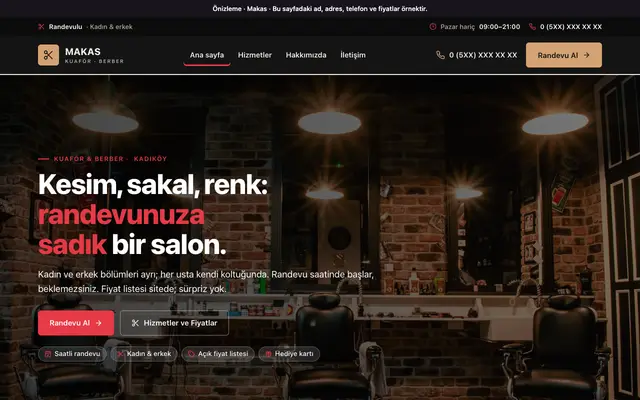
A theme preview we've prepared for hairdressing and barber salons; the card opens in a new tab.
Ready at setup
Ready at setup: service suggestions
When you choose your industry, the services below are added to your site in one click; you change their names, order and descriptions from the panel.
- Haircuts and hair care
- Hair colouring
- Men's hairdressing
Price
Hairdresser website pricing
Amounts are annual and read from the package table. Which package includes the stylists page and announcements is shown below.
₺5.000per year, starting from the Advantage package (+ VAT)
- Our Team is included in every package.
- Popups is included in every package.
SEO & GEO
Once your site is live: salon SEO service
On a separate page we explain which items make up our SEO and GEO work for this industry, search intent by sub-area, and frequently asked questions.
- A Page per Service
- Local Search Signals
- Question-and-Answer Content
- Technical Foundation and Speed
- Structure for AI
- Measurement and Monthly Report
Questions about hairdresser and barber websites
Can we describe the women's and men's sections separately on the site?
Yes. The Makas theme describes the salon's women's and men's sections; you write service names separately, such as "Men's haircut" and "Women's haircut and blow-dry". If you're a men-only barber or a women-only hairdresser, you remove the services you don't use.
Can customers choose their stylist when requesting an appointment?
The appointment form in the Makas theme has the service, day, time and an optional stylist preference. There's no booking system that shows free slots on a calendar: the request lands in your panel and you confirm the time by message or phone.
We have a social media account; do we still need a site?
Social media is good for showing your work, but your price list, working hours and address get lost in the feed. People searching Google for a hairdresser or barber by neighbourhood name are met by your site, which brings this information together in one place; the site also links to your social media accounts.
Can we sell the products we sell in the salon on the site?
No; there's no cart or online payment on the site. You can describe the care products you sell in the salon on a service page or in the About Us section, and make the sale in the salon.
How can we announce a gift card or a student discount?
You write the discount and its conditions under the price list or in an announcement that appears on the dates you choose. Stating clearly on which days and with which document it's valid prevents arguments in the salon.
Do you have a theme made for hairdressers and barbers?
Yes. The Makas theme was made for hairdressing and barber salons: it comes with services and a price list, women's and men's sections, stylists, a salon gallery and an appointment request form. You can open the preview from the examples section on this page.

Your salon's website: take the first step
We can set up the same infrastructure for your Hairdresser and Barber business.