

Restaurant and café website: the same menu on the table and on the site
Guests see your menu, prices and photos of the venue on your site; the QR code on the table opens the same menu. You change prices in one place; table, takeaway and catering requests come in through the form or WhatsApp.
- 8ready service suggestions
- SEO + GEOindustry-specific content
- 1 business dayon the fastest package
Quick quote
Your restaurant's website: get a quote
Fill in four fields; we'll get back to you the same day and build your site together.
- Same-day reply
- Live in 1 business day with a ready theme on the fastest package
- SSL, hosting and daily backups included
What the site needs to solve in this business
If the menu is out of date, guests are surprised at the table
Prices change often
The printed menu, social media posts and the list on the site are updated separately; when one is forgotten, guests see a different price at the table. Three prices for the same item in three places undermines trust.
Guests look at the menu on their phone
They open the menu on their phone before coming to the venue, or by scanning the QR code at the table. If the menu opens as a PDF or a photo, they have to zoom in, and there's no allergen information.
Table and order questions keep the phone busy
Is there a table tonight, which neighbourhoods do you deliver to, what time do you close: during service the phone is busy with these questions. If the answers are written clearly on the site, the team gets back to the kitchen and the floor.
Restaurant modules
Menu, QR menu and gallery in the same panel
Everything below is a screen that works today; the price box shows which package includes each one.
Menu and QR menu from one source
You arrange categories, product order and visibility on the Cafe Menu screen; the menu on the site and the QR menu on the table open from the same record. Change a price once and both are updated.
Price, description and allergens
You enter each product's price, short description, image and allergen information. Guests decide what to order before they sit down; fewer allergen questions go to the waiter.
Dish and venue photos
You upload photos of your own dishes, dining room and terrace, and choose which ones appear in the gallery. Photos are automatically converted to lightweight formats on upload and open fast on phones.
Daily menu and campaign announcements
You show the week's special menu, holiday hours or your newly opened terrace with an announcement that appears on the pages and dates you choose.
Examples
Restaurant website examples
Theme previews we've prepared for restaurants and cafés; each card opens in a new tab.
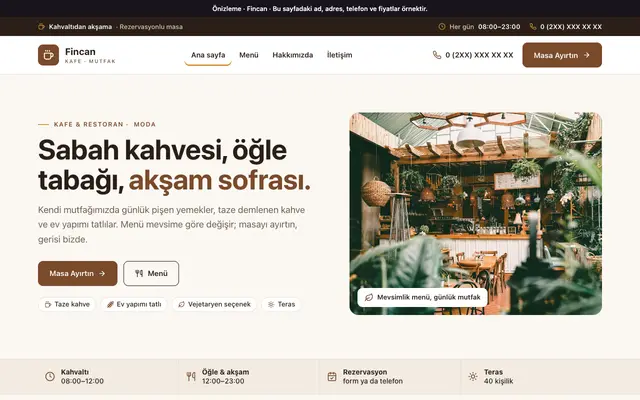
Fincan theme
For cafés and restaurants: a menu from breakfast to dinner, dining room and terrace, a table request in three steps.Open the preview, opens in a new tab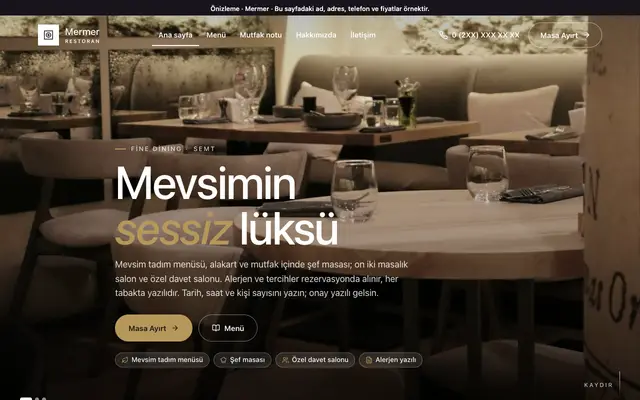
Mermer theme
For fine-dining restaurants: tasting menu, dining rooms and capacity, service hours and table requests.Open the preview, opens in a new tab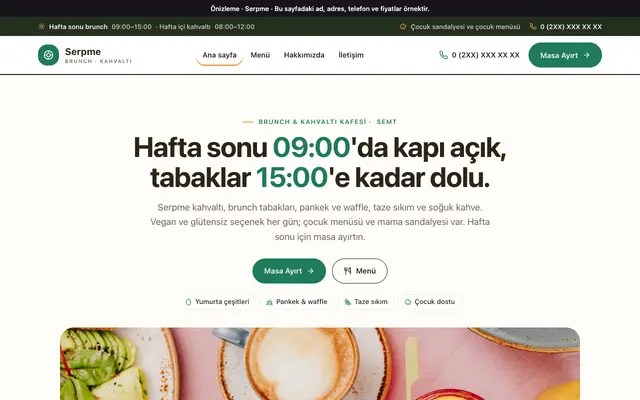
Serpme theme
For brunch and breakfast cafés: weekend hours, brunch plates, allergens and options, table requests.Open the preview, opens in a new tab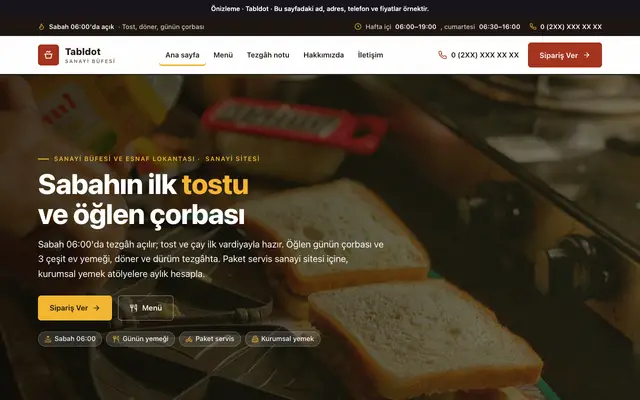
Tabldot theme
For canteens and buffets: menu board, counter hours, delivery areas and corporate catering requests.Open the preview, opens in a new tab
Ready at setup
Ready at setup: service suggestions
When you choose your industry, the services below are added to your site in one click; you change their names, order and descriptions from the panel.
- Restaurant
- Cafe
- Takeaway
- Online orders
- Group catering
- Catering and events
- Breakfast
- Desserts and patisserie
Price
Restaurant website pricing
Amounts are annual and read from the package table. Which package includes the menu and product modules is shown below.
₺5.000per year, starting from the Advantage package (+ VAT)
- Cafe Menu is included in every package.
- Cafe Product Management is included in every package.
SEO & GEO
Once your site is live: restaurant SEO service
On a separate page we explain which items make up our SEO and GEO work for this industry, search intent by sub-area, and frequently asked questions.
- Local search signals
- Menu and service pages
- Question-and-answer content
- Technical foundation
- Structure for AI
- Measurement and monthly report
Guide
What should a food and drink website look like? Menu, hours and reservations
For a business running a restaurant, café, patisserie or catering service, the website is often the only place customers look before they walk in. Someone looking for a new place wants to see the menu, opening hours and address; someone who wants takeaway looks for a way to order; a company considering group catering wants a quote. In this post, we explain what a food and drink website should include, how customers search for you and which details build trust.
Read the full articleClose the article
What is a food and drink website, and why do you need one?
A food and drink website is a corporate site that brings together a restaurant, café, patisserie or catering business's menu, opening hours, address, and booking and ordering options at one address, so customers can get to know the business before they visit or order. A social media account doesn't fully meet this need; posts get lost in the feed, and menu and opening hours get buried among comments. A page on an ordering platform works to the platform's layout; how it looks isn't in your hands. Your own site keeps this information current, in the order you decide. An out-of-date menu or wrongly listed opening hours means a customer turned away at the door.
Which pages should a restaurant or café site have?
The home page should say at a glance what kind of venue it is, where it is and when it's open; the details should be spread across sub-pages.
- Menu: split into categories, with prices and up to date; page text read by scrolling on the phone, not a PDF.
- Service pages: separate pages for takeaway, online orders, breakfast, group catering, catering and events; scope, area and terms explained there.
- Gallery: real photos of the venue, tables and dishes; not stock images.
- Frequently asked questions: the topics asked on the phone every day, such as reservations, parking, delivery area and vegetarian options.
- Contact and forms: address, map, phone, opening hours; a short form for reservations, and a quote form asking for number of guests and date for catering and group meals.
When each service has its own page, customers find what they're looking for easily.
How do customers search for a restaurant or café?
Most food and drink searches happen in the moment, on the phone and for nearby places, with phrases like "breakfast near me", "café open now" or "patisserie delivery". Anyone who can't find the menu and hours right away moves on to the next place on the list. For your site to fit this, the address, opening hours and phone number should be visible on every page; on mobile, one tap should call the number and one tap should open directions on the map. Page titles and descriptions should carry the venue type and service so search engines read correctly what the page is about. The name, address and opening hours in your map listings should match the site exactly. This isn't a ranking promise; it's the groundwork customers need to be able to find you when they search.
What builds trust?
Customers entrust you not just with a meal, but with an evening with their family or the table they'll set for their guests; trust is built with verifiable details, not fancy words.
- Real business details: trade name, full address, phone, opening hours and closing days; each branch listed separately, if any.
- Up-to-date menu and prices: the price on the site should match the price at the table; a changed item should be updated on the site the same day.
- Legal texts: privacy notice, cookie policy and privacy page; they should be complete, since you process personal data through reservation and order forms.
- Allergen and ingredient information: give allergen and special-diet notes in plain language, in line with the relevant rules; don't make health claims.
Don't use photos of dishes or venues that aren't yours; list as certificates and awards only those that are current and genuine.
Your food and drink website with Octofly
We prepare sites for restaurants, cafés, patisseries and catering businesses with packages whose price is known upfront; the structure needed for service pages, the gallery, FAQs and the quote form is ready. When you choose food and drink at setup, ready service suggestions such as takeaway, breakfast and group catering are added in one click. The design is prepared for you. Mobile-friendliness, SSL, hosting and daily backups are included; the page title, description and canonical URL are generated automatically. You update your texts, services and gallery yourself from the panel. If your content is ready, your site goes live in 1 business day with a ready theme on the fastest package. We're your single point of contact. Get in touch; we'll get back to you the same day.
Questions about restaurant websites
Are our restaurant and café services ready at setup?
When Cafe & Restaurant is selected, suggestions for restaurant, café, takeaway, online orders, group catering, catering and events, breakfast, and desserts and patisserie are added in one click. You choose the ones that fit your venue and change their names and descriptions from the panel.
Can we take online orders and payments on the site?
There's no cart or online payment on the site; no package includes e-commerce. With Order from the table, café guests order from the QR menu at the table and call the waiter or ask for the bill. Order, reservation and catering requests are taken through forms, a WhatsApp line and click-to-call; every request is kept in the inbox in the panel. Stating your delivery area and ordering hours clearly on the site reduces questions by phone.
How should we write allergen and ingredient information on the site?
Allergen and special-diet notes should be given in plain language and in line with the relevant rules, without health claims. When a dish's ingredients change, this information should be updated the same day; you change the texts yourself from the panel.
What should we watch out for in dish and venue photos?
Photos of dishes or venues that aren't yours shouldn't be used; customers compare the dish that arrives at the table with the one on the site. The gallery and video modules are included in every package; photos are automatically converted to lightweight formats on upload and don't slow the page down on phones.
How should we list our address, hours and closing days on the site?
Trade name, full address, phone, opening hours and closing days should be stated clearly. Keeping this information exactly the same as in your map listings means customers aren't sent to a closed door. List as certificates and awards only those that are current and genuine.
Do we need a separate app for the QR menu?
No. The QR menu opens from your menu on the Cafe Menu screen; you don't need to install a separate app. When guests scan the code on the table, the menu opens on their phone; product and price changes appear on the site and the QR menu at the same time.

Your restaurant's website: take the first step
We can set up the same infrastructure for your Cafe & Restaurant business.