

Dentist and dental clinic website: a site that earns trust before the examination
Patients find treatments, dentists, working hours and the clinic's address on your site; they send appointment requests through the form, WhatsApp or a one-tap call. Requests land in your panel, and reception calls to confirm the time.
- SEO + GEOindustry-specific content
- 1 business dayon the fastest package
Quick quote
Your dental clinic's website: get a quote
Fill in four fields; we'll get back to you the same day and build your site together.
- Same-day reply
- Live in 1 business day with a ready theme on the fastest package
- SSL, hosting and daily backups included
What the site needs to solve in this business
Patients who can't find information put off the appointment
Patients want to get to know the clinic beforehand
Many people put off going to the dentist; when they do decide, they first look at the dentists, the treatments and the sterilisation routine. If this information isn't on the site, they look for another clinic nearby.
Promotion rules apply in dentistry too
Patient reviews, before-and-after photos, price campaigns and promises of results run up against healthcare promotion rules. Most ready-made templates come with exactly these sections; if they stay on the site, the clinic is responsible.
Patients in pain call straight away
People with toothache look at your site on their phone, often in the evening. If they can't reach your number with one tap or can't find what to do in an emergency, they call the next clinic on the list.
Clinic modules
Treatments, dentists and posts in the same panel
Everything below is a screen that works today; the price box shows which package includes each one.
A separate page for each treatment
Examinations and preventive care, fillings and root canal treatment, gum treatment, dentures and implants, orthodontics, paediatric dentistry: each treatment sits on its own page, written in informative language. People who search by treatment name can find the right page.
Your doctors
Each dentist's name, title, degree and area of interest sit on the Our Team page; only people who have given explicit consent appear on the site.
Clinic photos
You upload photos of the waiting area, the dental units and the sterilisation room, and choose which ones appear in the gallery. You show the clinic itself instead of patient photos; images are automatically converted to lightweight formats on upload.
Oral and dental health posts
General information posts, such as brushing your teeth, a child's first visit to the dentist or aftercare following an implant, are published on the blog. The posts don't make a diagnosis; they direct readers to an examination.
Examples
Dentist website examples
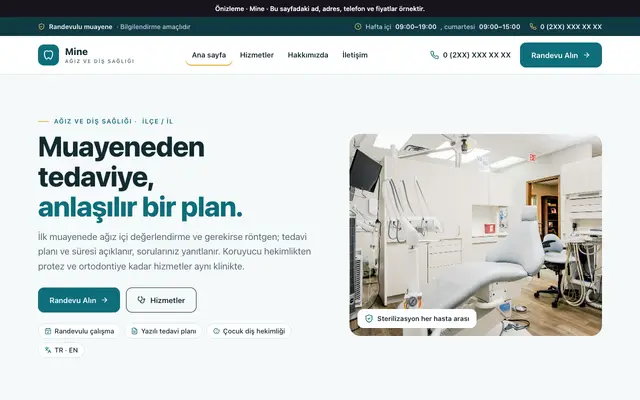
A theme preview we've prepared for dental clinics; the card opens in a new tab.
Ready at setup
Ready at setup: service suggestions
When you choose your industry, the services below are added to your site in one click; you change their names, order and descriptions from the panel.
- Dental treatments
- Implants
- Orthodontics
Price
Dentist website pricing
Amounts are annual and read from the package table. Which package includes the dentist page and the blog is shown below.
₺5.000per year, starting from the Advantage package (+ VAT)
- Our Team is included in every package.
- Blog is included in every package.
SEO & GEO
Once your site is live: clinic SEO service
On a separate page we explain which items make up our SEO and GEO work for this industry, search intent by sub-area, and frequently asked questions.
- A page per service
- Consistent contact details
- Question-and-answer content
- Technical crawl
- Structure for AI
- Measurement and monthly report
Questions about dentist websites
Can we list our treatment fees on the site?
The Mine theme has no price list section; the theme's copy says fee information is given at the clinic. Treatment fees become clear after the examination and treatment plan; it's enough to state on the site how fees are set and that they're discussed at the first examination.
What information does the appointment form ask patients for?
The form in the Mine theme asks for name, phone, optional email, service, and preferred day and time slot; the note field is optional. There's no booking system where patients pick a time from a calendar: the request lands in your panel, and reception calls to confirm the time. We recommend taking the details of the complaint at the examination, not on the form.
What should we tell patients on the site about emergency toothache?
You can state clearly on the contact page that patients should phone in an emergency, and whether a same-day slot can be found. Your phone number can be called with one tap on the site; stating how to reach you outside working hours also saves patients time.
Should we open a separate page for child patients?
If you offer paediatric dentistry, a separate service page makes it easier for parents researching the topic to find you. On the page, you describe in general terms how the first visit goes; photos of children should be used only with the parent's explicit permission.
How should we write the specialist dentist title on the site?
Use the title exactly as it appears on the diploma and the specialist certificate; the title "specialist" is used only for dentists who hold a specialist certificate. Stating specialist fields such as orthodontics or paediatric dentistry only on the card of the dentist who specialises in that field directs patients to the right dentist.
Do you have a theme made for dental clinics?
Yes. The Mine theme was made for oral and dental health clinics: it comes with treatments, the steps of the first examination, the sterilisation routine, the dentists on staff and an appointment request form; it has no patient images, reviews or price section. You can open the preview from the examples section on this page.

Your dental clinic's website: take the first step
We can set up the same infrastructure for your Dentist business.